
How the Profit & Loss Calculator works
The CleaRank Profit and Loss Calculator projects what a trade will make or lose before you take it, or reconstructs the P&L of a trade you already closed. It handles long and short directions, converts to your account currency, and includes trading costs so the number you see is the net result, not the gross one.
Open the Profit & Loss Calculator
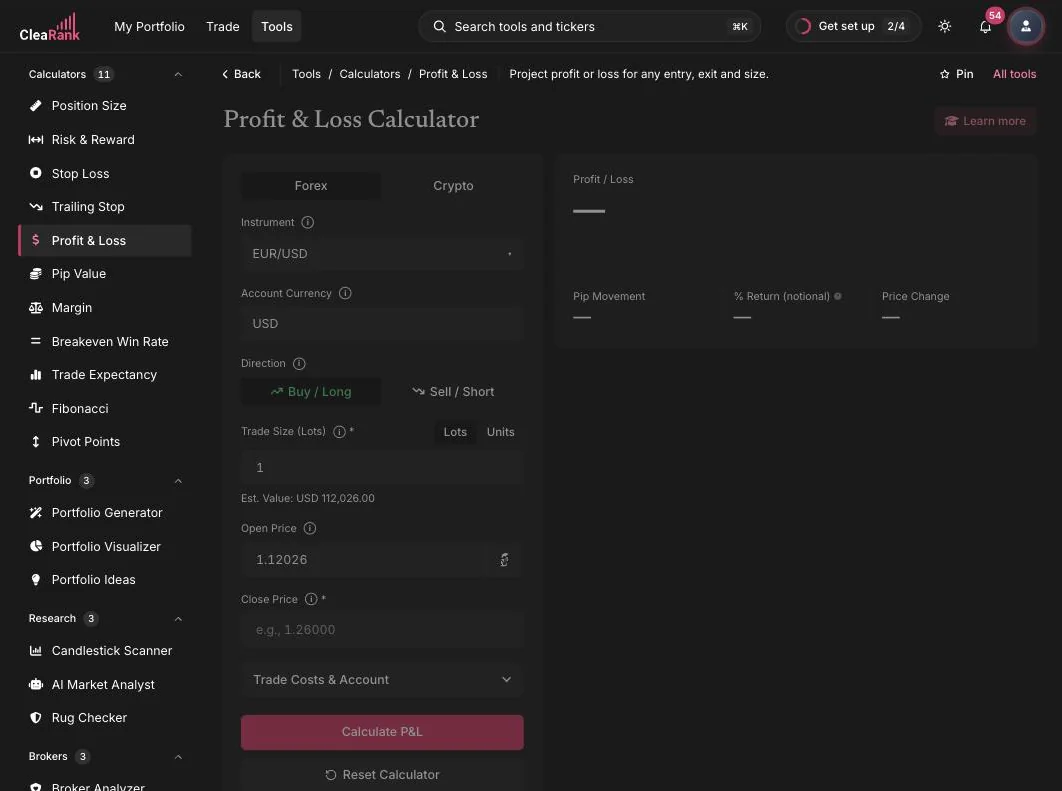
What a trade makes or loses after costs
The core logic is the price difference times the position size. In plain words: for a long trade, P&L = (close price minus open price) times position size; for a short trade the difference flips. The raw result is in the instrument’s quote currency, so the calculator converts it to your account currency at the live rate, then subtracts any trade costs you entered to give the net figure.
Worked example. Buy 1 lot of EUR/USD at 1.15298 and close at 1.16298. That is a 0.01000 move, or 100 pips, on 100,000 units: 0.01 x 100,000 = 1,000 USD gross profit. With 7 USD of round-trip costs entered in Trade Costs, the net P&L is 993 USD. The same trade as a Sell/Short would show a 1,000 USD gross loss.
Entry, exit, size, and fees
- Asset class and Instrument. Switch between the Forex and Crypto tabs, then pick the instrument, for example EUR/USD.
- Account Currency. The currency your result should be reported in (USD in the screenshot).
- Direction. Choose Buy / Long or Sell / Short. Direction decides which way the price difference counts.
- Trade Size. Enter lots or raw units via the Lots/Units toggle. The calculator shows the estimated position value underneath (Est. Value: USD 115,298.00 for 1 lot in the screenshot).
- Open Price and Close Price. Open Price can be synced from the live market; Close Price is your exit, target, or actual fill.
- Trade Costs & Account. An expandable section for commissions and other costs so the output is net P&L.
- Calculate P&L. Click Calculate P&L (or press Enter) to see the result; Reset Calculator clears the form.
When to price a trade before you take it
- Planning: before entry, test what the trade returns at your target and what it costs at your stop. Combined with the Risk Reward Calculator, this turns a vague idea into a defined trade.
- Reviewing: after a trade, verify a broker statement or reconstruct the numbers for your Trade Journal.
- Comparing scenarios: save alternative exits as scenarios (up to 20, reloadable from the Load menu) and compare them side by side.
Like all CleaRank calculators, it includes live market sync that never overwrites your typed values, inline explainers, PDF and CSV export, a Learn More panel, and light and dark mode. See the Calculators overview for everything the suite shares.
Frequently asked questions
How do I calculate profit and loss in forex?
Subtract the open price from the close price (reverse for shorts), multiply by the position size, then convert to your account currency and subtract costs. Example: buy 1 lot of EUR/USD at 1.15298, close at 1.16298: 100 pips x 10 USD per pip = 1,000 USD gross, minus fees for the net figure.
Does the calculator include fees and commissions?
Yes. The Trade Costs & Account section lets you add costs so the result is net P&L rather than gross. This matters for judging whether a strategy is actually profitable after expenses.
Can I calculate P&L for a short trade?
Yes. Select Sell / Short as the direction. The calculator then treats a falling price as profit and a rising price as loss, using the same price-difference-times-size logic in reverse.
How is P&L converted to my account currency?
The raw P&L lands in the instrument’s quote currency. If that differs from your account currency, the calculator converts at the live exchange rate, which is important on JPY-quoted and other cross pairs.
Try it yourself
Know the outcome of your trade plan before the market does.
Related articles
CleaRank tools are for education and analysis. Nothing in this guide is financial advice.