
Dashboard Overview
Signing in to CleaRank opens My Portfolio. There is no separate home screen: the dashboard is the three sections in the top bar, My Portfolio, Trade and Tools. This page explains what each section measures and where its numbers come from, so you always know which figures are real money and which are practice.
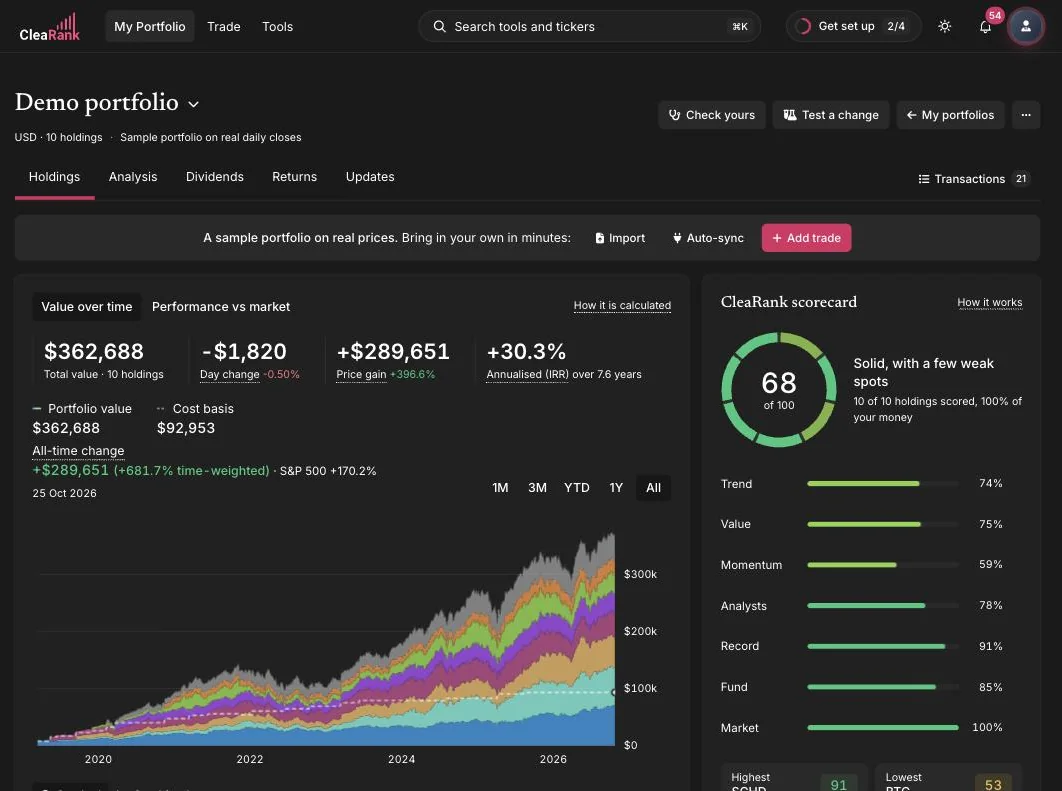
What opens after you sign in
You land on the Holdings page of My Portfolio. If you have not added a portfolio yet, it offers three ways in: import a broker file, connect a broker for a daily read-only sync, or type in a few trades by hand. Finding Your Way Around CleaRank covers the top bar, search and menus.
My Portfolio: your real holdings
Everything in My Portfolio comes from positions you actually own. Values use market prices delayed by up to a minute, converted into your portfolio currency at the current exchange rate. Cost and profit use the average cost method. Returns are shown two ways: time-weighted, which ignores when you added or withdrew money, and money-weighted, which counts it. The full method is in My Portfolio.
Trade: practice and review
- Trading Simulator. A practice account on real quotes that refresh every 30 seconds and can be up to a minute behind the market. Equity, which the simulator calls Net Liq, is cash plus open positions at the latest quotes. See Paper Trading.
- Trade Journal. Every closed simulator trade is written into the journal automatically, next to the trades you log or import. Its statistics, including the Discipline score, are built from closed trades only.
- Plan replay. Tests a trade plan on an asset’s own price history before you risk money on it.
Tools: the library
The calculators, the portfolio tools, the research tools and the broker tools. Each one has its own section in these docs, and each one can be pinned to your library or found by name from search.
Where the old home screen numbers went
Earlier versions opened on a home screen with stat cards, a watchlist, Market Pulse and a Daily Brief. That screen is not part of the current layout. Its numbers now sit with the tool that produces them:
- Practice equity, today’s result and open P/L are at the top of the Trading Simulator.
- Win rate and the Discipline score are on the Dashboard tab of the Trade Journal.
- The watchlist and price alerts are in the Trading Simulator; see Watchlist and Price Alerts.
- Notifications are behind the bell in the top bar.
Frequently asked questions
Is there still a home screen?
No. Signing in opens My Portfolio, and the CleaRank logo in the top bar always brings you back to it.
Where is my practice equity now?
At the top of the Trading Simulator, as Equity (the simulator calls it Net Liq), with Today, Open P/L and Available beside it. It is virtual practice money, not a real balance.
Where is the Discipline score?
On the Dashboard tab of the Trade Journal. It needs at least one trading rule and one closed trade before it shows a number.
Which numbers are real money?
Only the figures in My Portfolio, which come from holdings at your broker. Everything in the Trading Simulator, and the simulator trades in your journal, is practice money.
Start with your own portfolio
Sign up, add a portfolio, and every section fills with your own numbers.
Related articles
CleaRank tools are for education and analysis. Nothing in this guide is financial advice.