
Trading Simulator Overview
The CleaRank Trading Simulator lets you practice trading stocks, crypto, and forex with real market quotes (refreshed every 30 seconds, delayed up to one minute) and a virtual practice balance. No real money is involved, and every closed trade is journaled automatically.
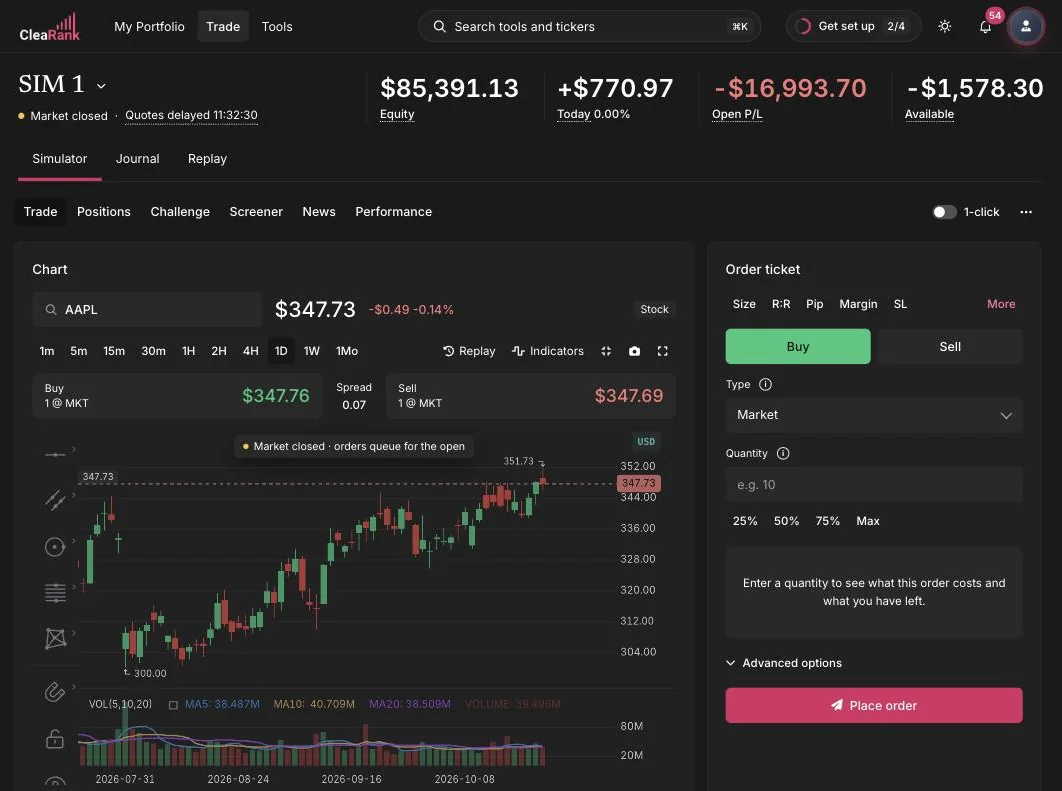
What the simulator is
The simulator is an education tool. You trade against real market quotes, refreshed every 30 seconds and delayed up to one minute, with a virtual practice balance, so your decisions face realistic conditions: a bid and ask spread on every fill, market hours, and margin. Because the balance is virtual, mistakes cost nothing.
Prices in the simulator are real market quotes, refreshed every 30 seconds and delayed up to one minute, but the bid and ask are modeled, not pulled from a broker’s live quote feed. The simulator places them symmetrically around the live traded price: bid is the price minus half the spread, ask is the price plus half the spread. The cost is real even though the quote is modeled. Fills execute at the bid and the ask, so every position pays the spread going in and again coming out, and your practice P&L is already net of it. That is why the results transfer: nothing here is quietly handing you a free fill. See Placing Orders for the modeled spread width per asset class and how to plan around your own broker’s spread.
It supports three asset classes: stocks, crypto, and forex. The watchlist ships with familiar symbols such as SPY, QQQ, AAPL, TSLA, BTC/USD, and EUR/USD, and you can add your own. The Trading Simulator page on clearank.com has the full feature rundown.
Multiple simulator accounts
You are not limited to one account. Your first account, Main Simulator, is created automatically when you sign up. Click New Simulator next to the account pill to create additional accounts, each with its own settings and track record. The Free plan includes 1 simulator account, Pro up to 3, and Unlimited has no set limit. Each account starts with a virtual practice balance of up to $100,000, or up to $500,000 on Unlimited. Use separate accounts to test different strategies side by side, or pair one with Challenge Mode to practice prop-firm style rules without contaminating your main track record. Each account also has its own Settings, and you can Reset an account or Export its data from the account strip.
The account strip
Above the tabs, the account strip shows four live metrics for the selected account:
- Net Liq: net liquidation value, what the account would be worth if every open position were closed at current prices.
- Liq P&L: the unrealized profit or loss across your open positions.
- Margin: how much of your balance is currently locked as margin for open positions.
- Available: what remains free to open new positions.
The strip also holds the 1-Click trading toggle, a market open or closed indicator, and a LIVE data badge.
The six tabs
- Trade: the main workspace with a candlestick chart, an order ticket showing the live price with its modeled bid and ask, and movable panels. See Placing Orders and Charts and Indicators.
- Positions: open positions with live P&L, working orders, partial close, and Flat All. See Managing Positions.
- Challenge: prop-firm style rule tracking against your simulator trading. See Challenge Mode.
- Screener: Top Gainers, Losers, Most Active, High Volume, and Breakouts across stocks, crypto, and forex. See Market Screener.
- News: CleaRank Financial AI sentiment gauge, sector heatmap, and economic calendar. See News and Sentiment.
- Performance: equity curve, R-multiple histogram, session heatmap, and per-symbol stats. See Performance Analytics.
Automatic journaling
Every closed simulator trade is mirrored into your Trade Journal automatically. You never have to log practice trades by hand: symbol, side, entry, exit, size, and P&L arrive in the journal on their own, where you can review them, tag setups, and add post-trade notes. Your discipline score and journal analytics include simulator activity from day one.
All simulator guides
Frequently asked questions
Does the Trading Simulator cost extra?
No. The simulator is included on every plan, including the Free plan, which needs no card. There is no separate simulator fee.
Does the simulator use real money?
No. The simulator uses a virtual practice balance only. It is an education tool: there are no deposits, no withdrawals, and no real positions in any market.
Does the simulator use real market prices?
Yes. The traded price is real market quotes, refreshed every 30 seconds and delayed up to one minute, and the simulator respects real market hours per asset class. The bid and ask are modeled, not pulled from a broker’s live quote feed: the simulator places them symmetrically around the live traded price. The cost is real even though the quote is modeled. Fills execute at the bid and the ask, so every position pays the spread going in and again coming out, and your practice P&L is already net of it.
Can I have more than one simulator account?
On Pro and Unlimited, yes. Click New Simulator next to the account pill to create additional accounts, each with its own settings and track record. Pro includes up to 3 simulator accounts and Unlimited has no set limit; the Free plan includes 1.
Do I have to log my practice trades manually?
No. Every closed simulator trade is automatically mirrored into your Trade Journal, where you can review it, tag the setup, and add notes.
Try it yourself
Open the simulator and place your first practice trade in under a minute.
Related articles
CleaRank tools are for education and analysis. Nothing in this guide is financial advice.