
How the Investment Portfolio Generator works
CleaRank’s Portfolio Generator builds a risk-aware, multi-asset portfolio from your goals. Tell it your risk tolerance, time horizon, and investment amount, and it proposes a diversified allocation drawn from a curated, strategy-specific universe of ETFs and large-cap names, complete with a rebalancing schedule.
How it works
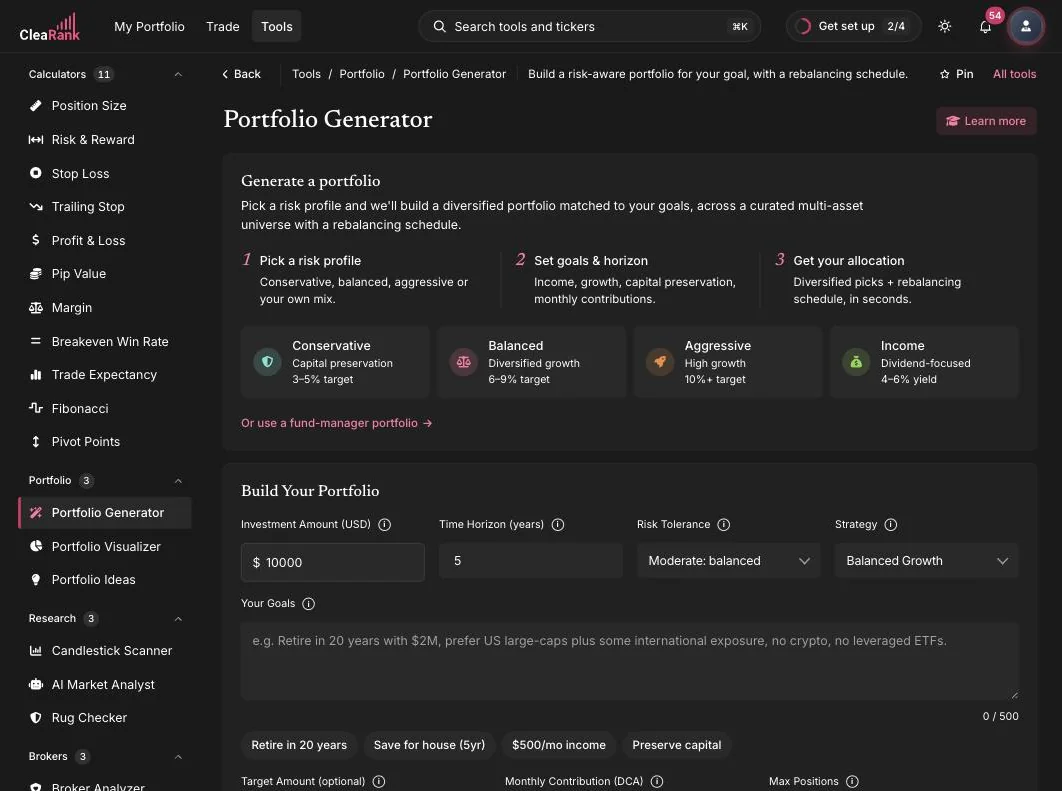
Generation follows three stages, shown at the top of the tool. First you pick a risk profile, then you set your goals and horizon, and finally the Generator produces a diversified allocation with a rebalancing schedule. You can also skip the presets and start from a fund manager portfolio via the link below the profile cards.
The Generator does not pick from a large open universe. Candidates are suggested for the strategy you chose, then checked against a curated list built for that strategy: mostly broad market, sector and factor ETFs, bond ETFs, and a set of large-cap single names, with leveraged ETFs included only when you switch them on. That constraint is deliberate, because a small, liquid universe is what keeps the results stable enough to act on. If you want a specific ticker that is not in that universe, the Portfolio Visualizer is not restricted, so you can enter any ticker its market data covers and backtest the mix yourself.
Four preset risk profiles are available:
- Conservative. Capital preservation with a 3 to 5 percent target.
- Balanced. Diversified growth with a 6 to 9 percent target.
- Aggressive. High growth with a 10 percent plus target.
- Income. Dividend-focused with a 4 to 6 percent yield target.
Generate your first portfolio
- Open the tool. Open Tools in the top bar and choose Portfolio Generator, or find it by name with Search tools and tickers (Cmd+K or Ctrl+K). You can also open clearank.com/tools/portfolio-generator directly.
- Pick a risk profile. Choose Conservative, Balanced, Aggressive, or Income, or configure everything yourself in the form below the cards.
- Enter your amount and horizon. Set the Investment Amount in USD and the Time Horizon in years. These drive how the allocation balances growth against stability.
- Choose Risk Tolerance and Strategy. The Risk Tolerance dropdown (for example “Moderate: balanced”) and the Strategy dropdown (for example “Balanced Growth”) refine the mix.
- Describe your goals. The Your Goals field accepts plain language, for example “Retire in 20 years with $2M, prefer US large-caps plus some international exposure, no crypto, no leveraged ETFs.” Constraints you write here shape the result.
- Generate. Run the Generator and review your allocation, its expected metrics, and the rebalancing schedule.
Optimizer and Monte Carlo quality settings
The Generator includes an optimizer and a Monte Carlo simulation with adjustable quality settings. Higher quality settings run more simulation work, which produces more stable estimates but takes longer to finish; lower settings return faster with rougher numbers. If you are iterating quickly on different goal combinations, start with a lower quality setting and raise it for the final run you plan to keep.
Saved portfolios
You can save generated portfolios and return to them later, so a result you like is never lost when you experiment with different inputs. Saved portfolios are also the bridge to the rest of CleaRank: you can reopen one to compare against a new generation, or push it into the simulator.
Deploy to the simulator
Once you have an allocation you want to watch in action, deploy it into the Trading Simulator as a basket of positions. The deployment opens the positions in your simulator account using its virtual practice balance, so you can follow real market movement, track P&L, and practice rebalancing decisions without risking anything.
If you want a quick summary of the tool before signing in, the Portfolio Generator page on clearank.com covers the highlights.
Frequently asked questions
What instruments can the Generator allocate across?
Candidates are suggested for the strategy you chose and then checked against a curated list built for that strategy: mostly broad market, sector and factor ETFs, bond ETFs, and a set of large-cap single names, with leveraged ETFs included only when you switch them on. Constraints you add in the Your Goals field, such as excluding crypto or leveraged ETFs, are respected in the result. If you want a ticker outside that universe, the Portfolio Visualizer is not restricted, so you can enter any ticker its market data covers and backtest the mix there.
Can I start from a fund manager portfolio instead of a risk profile?
Yes. Below the risk profile cards there is an “Or use a fund-manager portfolio” link that takes you to Portfolio Ideas, where you can pick from 543 fund manager portfolios and customize from there.
Does deploying a portfolio use real money?
No. Deployment places the basket of positions in your Trading Simulator account, which uses a virtual practice balance. CleaRank never places real trades or holds real funds.
How accurate are the expected metrics?
They are estimates produced by the optimizer and Monte Carlo simulation from historical data. They describe a range of plausible outcomes, not a prediction, and real results can fall outside that range.
Try it yourself
Generate a goal-based portfolio in minutes.
Related articles
CleaRank tools are for education and analysis. Nothing in this guide is financial advice.