
How the Stop Loss Calculator works
The CleaRank Stop Loss Calculator turns a placement rule into a concrete stop price using one of four methods: percentage, ATR-based, fixed distance, or support and resistance. It also estimates the probability of the stop being hit, so you can judge whether a stop is protective or just close enough to guarantee a loss.
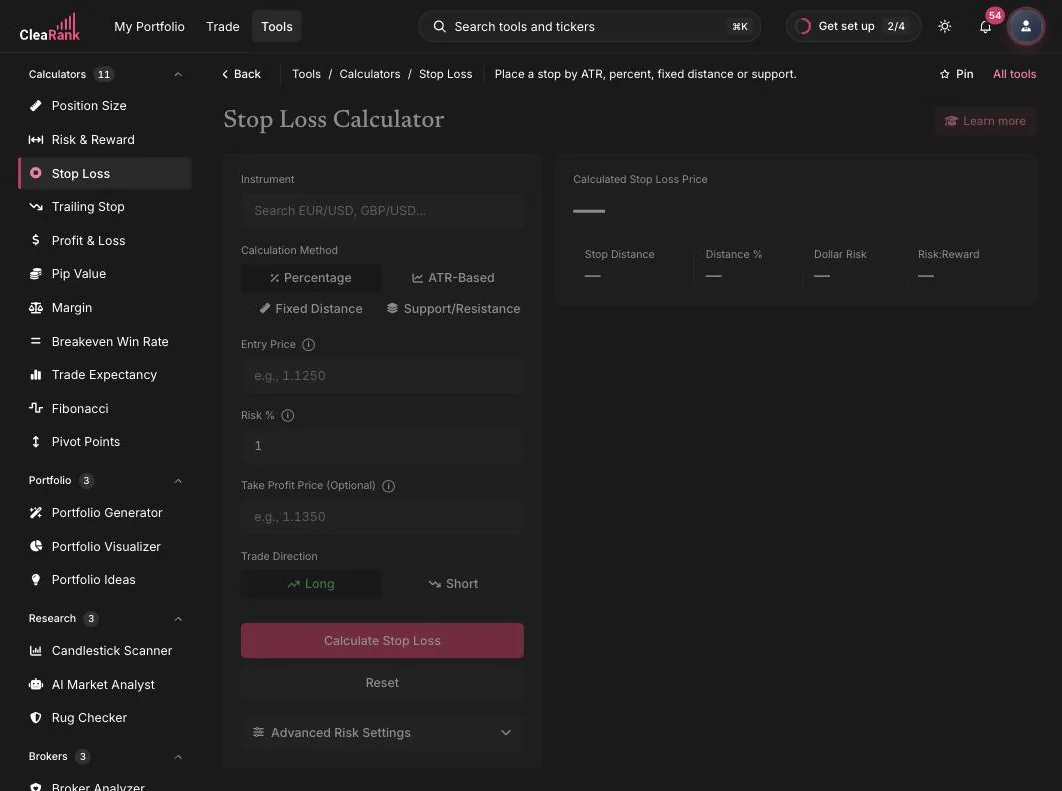
Where to put the stop for the risk you accept
A stop loss is the price where your trade idea is wrong and the position should close. The calculator turns a placement rule into an exact price. In plain words: pick a method, give it an entry price and direction, and it returns the stop level, the distance from entry, and an estimate of how likely that stop is to be tagged given the instrument’s behavior.
The four methods
- Percentage: the stop sits a fixed percent away from entry. Simple and consistent across instruments.
- ATR-Based: the distance is a multiple of the Average True Range, so the stop widens in volatile markets and tightens in quiet ones. This is the volatility-aware way to avoid being stopped out by ordinary noise.
- Fixed Distance: you specify the distance directly in price units or pips, useful when your strategy defines it.
- Support/Resistance: the stop goes just beyond a structural level, where the market proves the setup wrong rather than merely wobbling.
Worked example. Long EUR/USD from 1.1250 with the Percentage method at 1%. Stop = 1.1250 x (1 – 0.01) = 1.11375, a distance of 112.5 pips. The same 1% on a short from 1.1250 puts the stop above entry at 1.13625. Switch to ATR-Based and the distance adapts to current volatility instead of a fixed percent.
Entry, risk amount, and the stop method you choose
- Instrument. Search a symbol such as EUR/USD or GBP/USD and live market context fills in around it.
- Calculation Method. Choose Percentage, ATR-Based, Fixed Distance, or Support/Resistance from the segmented control. The input fields adjust to the method.
- Entry Price and Risk %. Your planned entry and, for the percentage method, how far the stop sits from it (1% by default).
- Take Profit Price (optional). Add a target and the calculator shows the resulting risk-to-reward alongside the stop.
- Trade Direction. Long or Short; the stop lands below entry for longs and above for shorts.
- Calculate Stop Loss. The output is the exact stop price, the distance, and a probability-of-stop estimate for the setup.
When to set the stop before the entry
- Before every entry: the stop price is the input the Position Size Calculator needs to size the trade correctly.
- When a market’s volatility has changed and yesterday’s fixed distance no longer makes sense; the ATR method adapts automatically.
- When placing stops around structure, using the Support/Resistance method with levels from the Pivot Points Calculator.
A public version of the tool is also available at clearank.com/tools/stop-loss-calculator/. In the dashboard you additionally get Save Scenario, PDF and CSV export, the Learn More panel, and the Stop chip inside the simulator that prefills the chart’s symbol and price.
Frequently asked questions
How do I calculate where to put my stop loss?
Pick a placement rule and apply it to your entry. With the percentage method, multiply entry by (1 minus the percent) for a long: 1.1250 at 1% gives 1.11375. With ATR, subtract a multiple of the Average True Range. With structure, place the stop just beyond the support or resistance that invalidates the trade.
What is an ATR-based stop loss?
A stop set at a multiple of the Average True Range, a rolling measure of how much the instrument moves per period. Because the distance scales with volatility, the stop stays outside normal noise in wild markets and does not waste room in quiet ones.
Should I use a percentage or fixed-distance stop?
Percentage stops are consistent relative to price and easy to standardize. Fixed distances suit strategies with explicit rules. ATR and support/resistance methods are usually better anchored to how the market actually behaves; the calculator lets you compare all four on the same entry.
What does the probability-of-stop estimate mean?
It estimates how likely price is to reach your stop level given the instrument’s typical movement. A very high probability warns that the stop is inside normal noise and likely to be hit even when the trade idea is right.
Try it yourself
Put your stop where the trade is wrong, not where it hurts least.
Related articles
CleaRank tools are for education and analysis. Nothing in this guide is financial advice.