
Market Screener
The Market Screener in the CleaRank Trading Simulator finds the day’s biggest movers across curated universes of stocks, crypto, and forex. Scan for Top Gainers, Losers, Most Active, High Volume, or Breakouts, then load any result straight into the Trade tab with one click.
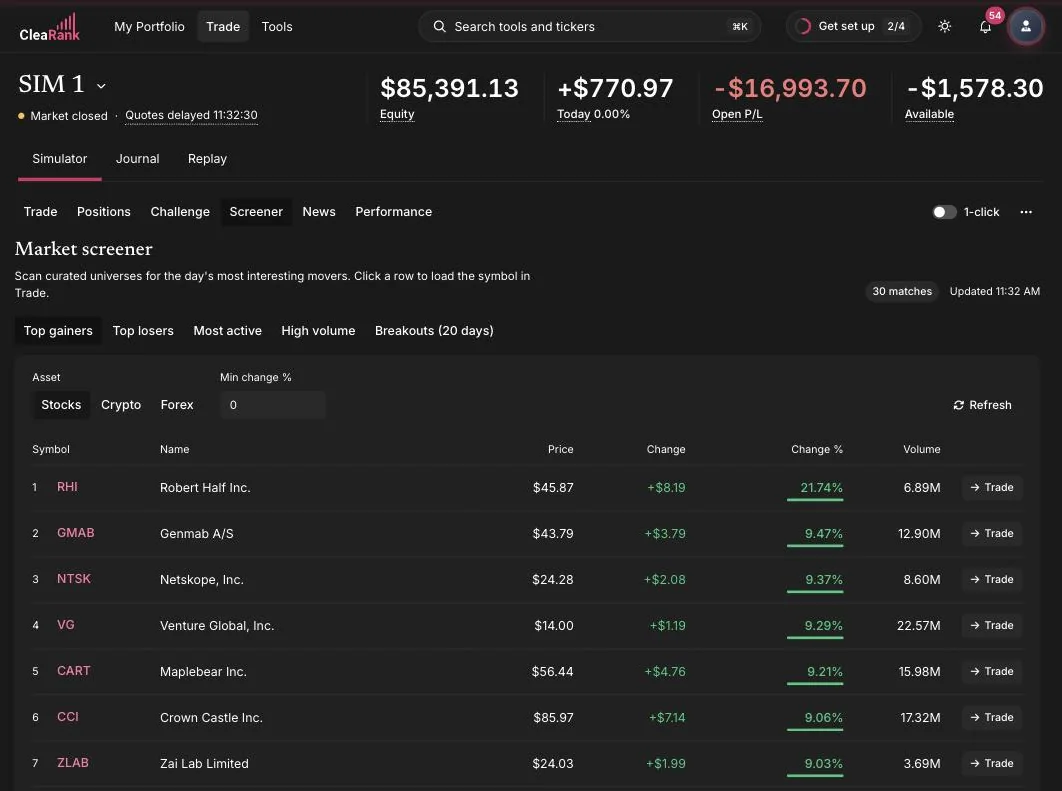
The five scans
Pick a scan from the chip row at the top of the tab:
- Top Gainers: the biggest percentage risers right now. Momentum continuation and pullback setups start here.
- Top Losers: the biggest fallers. Useful for practicing short setups or hunting overdone selloffs.
- Most Active: the names trading the most, where the crowd’s attention is today.
- High Volume: symbols trading well above their usual volume, often a sign something changed.
- Breakouts (20D): symbols pushing through their 20-day range, candidates for breakout entries.
Asset universes
Switch the Asset toggle between Stocks, Crypto, and Forex. Each scan runs over a curated universe rather than the entire market: 42+ stocks, 20 cryptocurrencies, and 14 forex pairs, chosen to be liquid, recognizable names that are practical to trade in the simulator. The header shows how many matches the current scan found and when the results were last updated, and a Refresh button re-runs the scan on demand.
Filtering and reading results
Use the Min |Change %| input to hide small moves, for example set it to 2 to only see symbols moving at least two percent in either direction. Results are ranked and each row shows the symbol, name, price, change, change percent, and volume, so you can judge both the size of the move and the participation behind it.
From result to trade
Every row ends in a Trade button. Click it (or the row) and the simulator loads that symbol into the Trade tab, chart and order ticket ready. A common practice loop:
- Scan. Run Top Gainers on stocks in the morning, or Breakouts after a quiet stretch.
- Filter. Raise Min |Change %| until only meaningful movers remain.
- Inspect. Click Trade on a candidate and read the chart: is the move clean trend or exhausted spike?
- Act or watch. Place a practice order, or add the symbol to your watchlist with a price alert at your level.
Frequently asked questions
Which markets does the screener cover?
Three curated universes: 42+ liquid stocks, 20 cryptocurrencies, and 14 forex pairs. Scans run within the selected asset class, switch between them with the Stocks, Crypto, and Forex toggle.
What counts as a breakout in the Breakouts scan?
The Breakouts (20D) scan surfaces symbols pushing beyond their 20-day price range, a common definition of a short-term breakout worth a closer chart look.
How fresh are the screener results?
The header shows the last update time for the current scan, and the Refresh button re-runs it on demand, so you always know exactly how current the table is.
Can I trade a screener result directly?
Yes. Each result row has a Trade button that loads the symbol into the Trade tab with the chart and order ticket ready. The screener, chart, and ticket are designed as one loop.
Try it yourself
Run a Top Gainers scan and practice-trade the strongest chart you find.
Related articles
CleaRank tools are for education and analysis. Nothing in this guide is financial advice.