
How the Position Size Calculator works
The CleaRank Position Size Calculator works out how large a position should be for a given trade. It works backward from your account balance, the percentage you are willing to risk, and your stop-loss distance, so a losing trade only ever costs the amount you chose in advance.
Open the Position Size Calculator
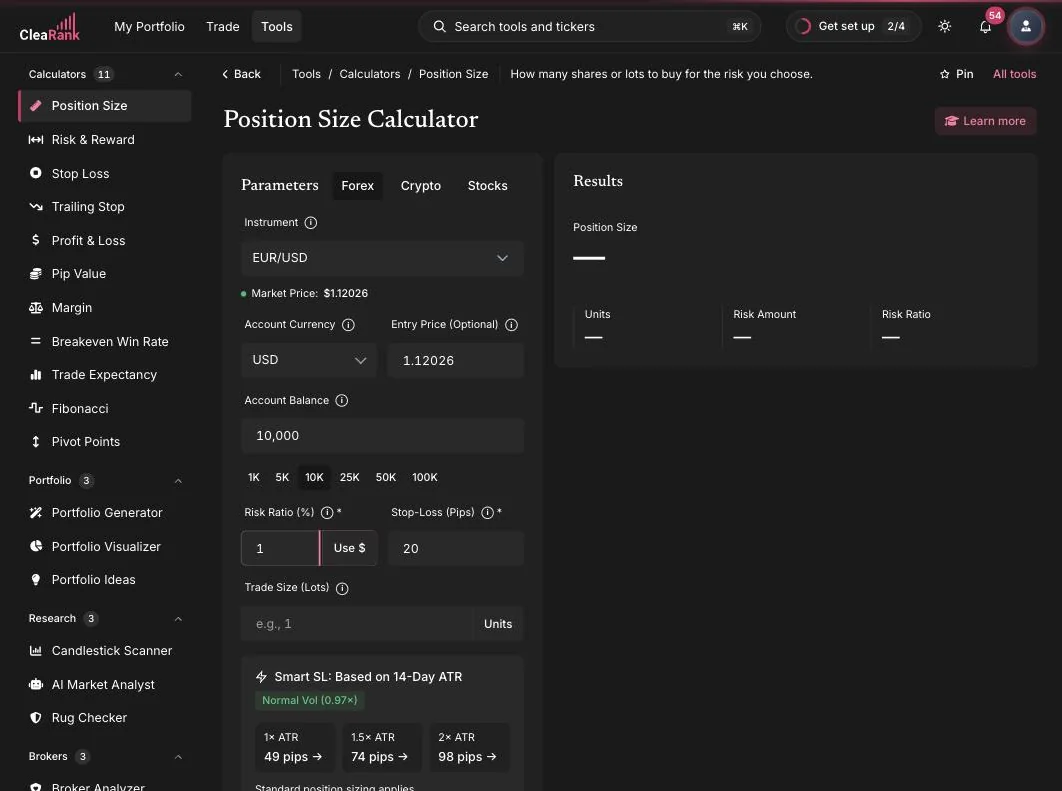
How many units to trade for a fixed risk
The calculator converts your maximum acceptable loss into a trade size. In plain words: first turn your risk percent into a dollar amount (balance times risk percent). Then divide that dollar amount by what the trade loses per lot if the stop is hit (stop distance in pips times the pip value per lot). The result is the largest position size where hitting your stop costs exactly your planned risk, and nothing more.
Worked example. Balance 10,000 USD, risk 1% = 100 USD. Stop-loss 20 pips on EUR/USD, where one pip is worth 10 USD per standard lot. Size = 100 / (20 x 10) = 0.5 lots. If the stop is hit, you lose 100 USD, exactly 1% of the account.
Account size, risk percent, and stop distance
- Choose the asset class. Tabs at the top switch between Forex, Crypto, and Stocks.
- Account Currency and Instrument. Pick your account currency (USD in the screenshot) and the instrument, for example EUR/USD. A Market Price badge shows the live rate ($1.15301 in the screenshot); Entry Price is optional if you want to plan around a different level.
- Account Balance. Type it or tap a quick chip (1K, 5K, 10K, 25K, 50K, 100K).
- Risk Ratio (%). The percent of your balance to risk, with a Use $ toggle if you prefer a fixed dollar amount.
- Stop-Loss (Pips). Your stop distance. The Smart SL panel suggests distances from the 14-day ATR (in the screenshot: 49 pips at 1x ATR, 74 at 1.5x, 98 at 2x) and flags the current volatility regime.
- Calculate. The result is your trade size in lots (or units, via the Units toggle). An Advanced section adds Kelly Criterion sizing for statistically minded traders.
The 1-2% risk rule
Most risk-management frameworks suggest risking no more than 1 to 2 percent of your account on a single trade. The reason is survival math: at 1% risk, a streak of ten straight losses draws the account down about 10%, which is recoverable. Risking 10% per trade, the same streak destroys nearly two thirds of the account. Position sizing is how you enforce that rule mechanically, trade after trade, instead of relying on discipline in the moment.
A common mistake is picking the size first and the stop second. Do it in the other order: decide where the trade is wrong (the stop), then let the calculator derive the size. A wider stop simply means a smaller position at the same risk.
When to size a trade with this calculator
- Before every trade where you have a defined stop. It takes seconds and removes size guesswork.
- When volatility changes: the Smart SL ATR suggestions adapt stop distances to current conditions.
- Inside the Trading Simulator, via the Size chip above the chart, which prefills the symbol and live price.
The calculator shares the standard CleaRank toolkit: live market sync that never overwrites your edits, Save Scenario with a Load menu (up to 20 per tool), PDF and CSV export, a Learn More panel, and Enter to apply. See the Calculators overview.
Frequently asked questions
How do I calculate position size in forex?
Multiply your account balance by your risk percent to get your risk in money, then divide by the stop distance in pips times the pip value per lot. Example: 10,000 USD at 1% risk = 100 USD; with a 20-pip stop and 10 USD per pip per lot, size = 100 / 200 = 0.5 lots.
What is the 1-2% risk rule?
A guideline that says no single trade should risk more than 1 to 2 percent of your account. It keeps losing streaks survivable: ten straight 1% losses cost about 10% of the account, while ten 10% losses would wipe out nearly two thirds of it.
How far should my stop loss be?
Far enough that normal price noise does not hit it. The calculator’s Smart SL panel suggests distances based on the 14-day Average True Range: 1x ATR for tight stops, 1.5x for standard, 2x for room in volatile conditions. Your position size then adjusts so risk stays constant.
Can I risk a fixed dollar amount instead of a percent?
Yes. Use the Use $ toggle next to the Risk Ratio field to enter a fixed money amount, for example 150 USD per trade, and the calculator sizes the position from that instead.
Try it yourself
Size your next trade by risk, not by feel.
Related articles
CleaRank tools are for education and analysis. Nothing in this guide is financial advice.