
Trading Calculators
CleaRank includes eleven trading calculators: margin, position size, pip value, profit and loss, risk reward, breakeven win rate, Fibonacci, pivot points, stop loss, trailing stop, and trade expectancy. Each one answers a specific pre-trade question, and this section links to a guide for every calculator.
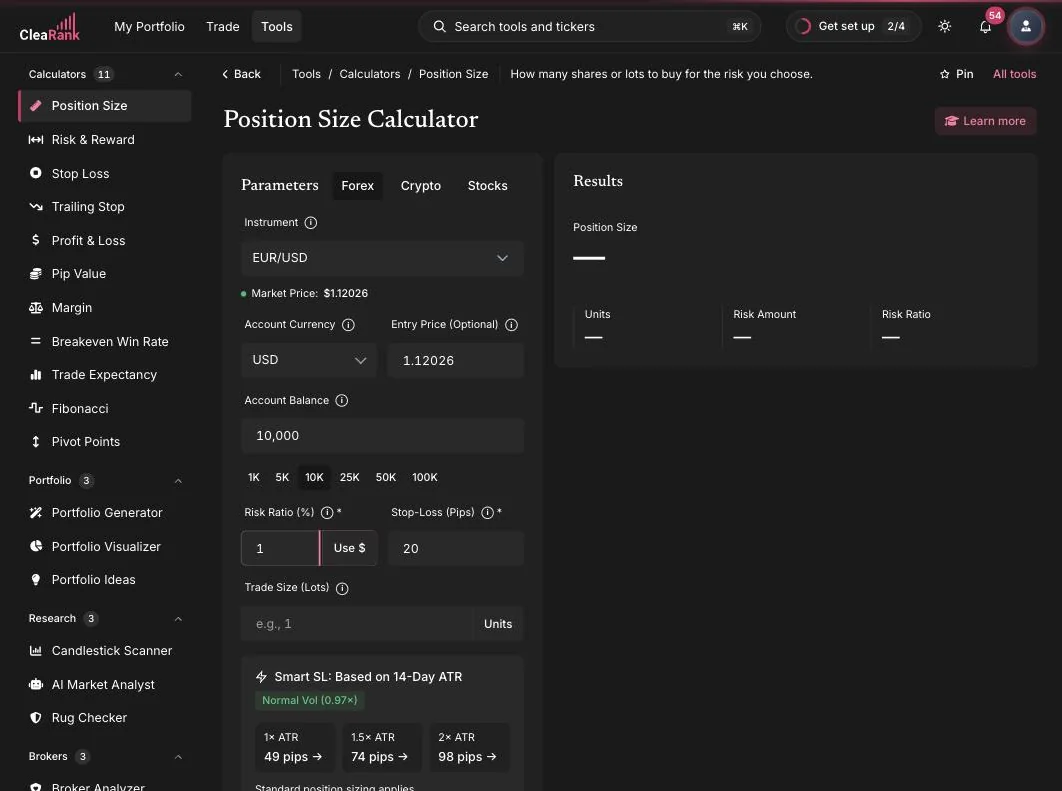
The eleven calculators
What the calculators share
The calculators are built on one design system, so once you have used one, you know them all. Everything below is on all eleven except the CleaRank Financial AI analysis panel, which is noted separately:
- CleaRank Financial AI analysis. After you calculate, most calculators show a CleaRank Financial AI panel that reads the inputs and the result you just produced, then explains in plain language what the number implies and where the setup is fragile, for example that a stop this tight sits inside normal daily noise. It is an explanation, not a recommendation: it never places an order and it never changes your inputs. The Margin Calculator is the one exception and has no AI analysis panel. CleaRank Financial AI output is educational and is not financial advice.
- Live market context sync. A banner offers current market prices for the instrument you pick (for example, EUR/USD at its live rate). It never overwrites values you typed yourself.
- Inline explainers. Every input has a small info marker explaining what the field means and how it affects the result.
- Learn More panel. Each tool has an educational slide-out that covers the concept behind the calculator in more depth.
- Save Scenario and Load. Save up to 20 named scenarios per calculator and reload any of them from the Load menu.
- PDF and CSV export. All 11 calculators export to PDF and CSV, so you can keep a record of the numbers you planned with or hand them to someone else. Across the wider dashboard, exports vary by tool, and several tools export JSON only.
- Cross-tool deep links. Send a result into another tool, for example straight into the simulator order ticket.
- Keyboard friendly. Press Enter to apply, with ARIA labels for screen readers.
- Form memory. Your last inputs are remembered, so you do not retype account balance and currency every visit.
- Light and dark mode. Every calculator follows your theme choice.
Which calculators have a second mode
Most people only ever use the basic mode, then hit the question it cannot answer: how does this compare with my other setup, what happens if volatility doubles, what does this look like across a hundred trades. That question is usually already answered by a second mode sitting one tab or one panel away. Here is every extra mode in the suite, so you know what to look for before you go hunting.
| Calculator | Extra modes beyond the basic calculation |
|---|---|
| Margin | Three top tabs: Calculator, Compare (two setups side by side), and Portfolio (several positions at once). |
| Position Size | Kelly Criterion advanced panel, and Smart SL, a stop suggestion derived from the 14-day ATR. |
| Pivot Points | Five pivot methods (Floor, Woodie, Camarilla, DeMark, Fibonacci), Auto-Fill from Market or Manual input, plus Multi-Timeframe (daily, weekly and monthly pivots at once) and Historical Accuracy (how often those levels were actually hit). |
| Stop Loss | Four stop methods: Percentage, Fixed distance, ATR, and Support or Resistance. |
| Trailing Stop | Five trail strategies: Fixed, ATR, Chandelier, Parabolic SAR, and Keltner. |
| Risk and Reward | Quick Templates, and multiple take-profit targets (add up to three, for planning partial exits), plus a set take-profit at 2x ATR shortcut. |
| Breakeven Win Rate | A Trading Costs and Slippage panel with a running cost total, and Multiple Position Averaging. |
| Trade Expectancy | Save Scenario and Load Scenario for building and comparing strategy variants, and a Monte Carlo simulation. |
| Fibonacci | Retracements, Extensions and Confluence views, with Auto-Fill from Market or Manual input. |
| Profit and Loss | Lots or Units size toggle. |
| Pip Value | No extra modes, single calculation. |
Where the calculators live
Open any calculator from the Calculators group in Tools, or find it by name with Search tools and tickers (Cmd+K, Ctrl+K or /). Inside the Trading Simulator, the most used calculators are also available as quick-access chips above the chart (Size, R:R, Pip, Margin, Stop, Trail, B/E, Expect). These embedded mini-calculators read the chart context, so the symbol and current price are already filled in.
A practical pre-trade flow: size the position with the Position Size Calculator, check the risk-to-reward ratio, confirm the margin requirement, then send the numbers to the simulator order ticket.
Frequently asked questions
Do I need a paid plan to use the calculators?
No. All eleven calculators are included on every plan, including the Free plan, which needs no card, alongside the rest of the analytical tools. Pro and Unlimited, billed yearly, add more CleaRank Financial AI answers a day (Free has 3), saved scenarios, PDF and CSV exports and the Prop Firm Auditor. Several of these calculators also have a public version on clearank.com/tools/ that is free to use in your browser without an account.
Do the calculators use live market prices?
Yes. Each calculator can sync live market context for the instrument you select, shown in a banner or price badge. You can accept the live price with one click or type your own value; the sync never overwrites your edits.
Do the calculators include CleaRank Financial AI analysis?
Most of them do. After you calculate, a CleaRank Financial AI panel reads the inputs and the result you just produced and explains in plain language what the number implies and where the setup is fragile. It is an explanation, not a recommendation: it never places an order and it never changes your inputs. The Margin Calculator does not have an AI analysis panel. CleaRank Financial AI output is educational and is not financial advice.
Can I save my calculations?
Yes. Every calculator has Save Scenario, which stores up to 20 named scenarios per tool. Reload any saved scenario from the Load menu, and export results to PDF or CSV.
Can I send a result into the trading simulator?
Yes. The calculators support cross-tool deep links, so a position size or stop level you just worked out can be sent into the simulator order ticket. Inside the simulator, chart chips embed the same calculators with the chart’s symbol and price prefilled.
Try the calculators yourself
Plan your next trade with numbers, not guesses.
Related articles
CleaRank tools are for education and analysis. Nothing in this guide is financial advice.