
Creating Your CleaRank Account
Creating a CleaRank account takes about a minute with email or Google sign-in. CleaRank then sets up your workbench automatically: a profile, a simulator account with a virtual practice balance, and a default trade journal.
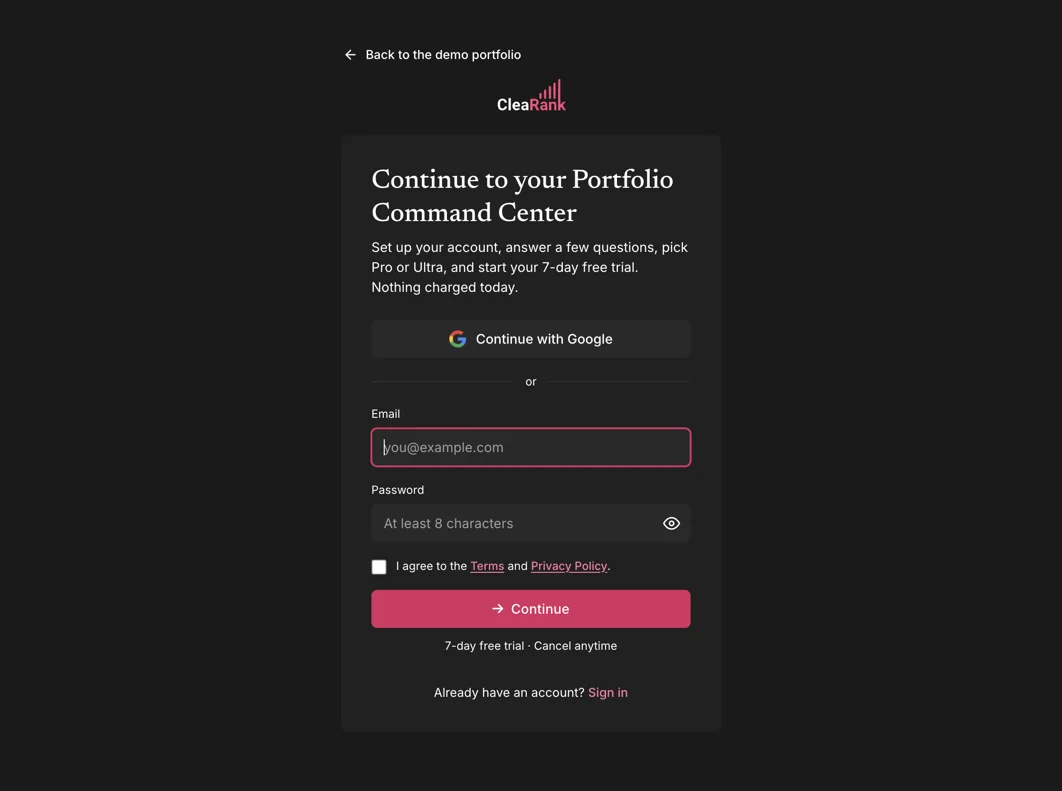
Sign up in four steps
- Open the signup page. Go to clearank.com/signup. If you already have an account, use the Sign in link at the bottom of the card instead.
- Choose how to sign up. Click Continue with Google, or enter your email address and a password of at least 8 characters.
- Accept the terms. Tick the checkbox to agree to the Terms and Privacy Policy, then press Continue.
- Choose a plan, or stay on Free. A new account starts on the Free plan, with no card needed. If you signed up from a Pro or Unlimited button, checkout opens next; both are billed yearly, and you can cancel anytime in Settings → Billing. See Plans and Billing for details.
What CleaRank creates for you automatically
The moment your account exists, CleaRank sets up everything you need to start practicing. There is no separate setup wizard to complete first:
- Your profile. Your display name and a generated avatar, both editable later in Settings.
- A simulator account. A ready-to-trade account in the Trading Simulator, preloaded with a virtual practice balance. This is practice money for education only, never real funds.
- A default trade journal. Closed simulator trades mirror into it automatically, and you can add manual trades or import broker CSVs at any time.
The onboarding tour and Setup guide
On your first visit, CleaRank offers a guided onboarding tour: 14 short steps that point out the main sections, the simulator, the journal, and the key controls. There are separate desktop and mobile versions, so the tour matches the device you are on.
The Setup guide in the account menu lists your first steps, with what is done and what comes next. You can replay the tour whenever you like: open the account menu by clicking your avatar in the top-right corner and choose the replay option.
The demo dataset, and how to erase it
An empty dashboard is hard to learn from, so CleaRank can load an optional demo dataset into new accounts: 50 sample trades plus matching journal entries, plans, and tags. With it, every widget, chart, and analytics view shows a realistic example instead of an empty state.
When you are ready to start with a clean slate, erasing the demo data takes one click: use the demo banner shown in the app and confirm. Your own trades and settings are not affected.
Signing in later
Return to clearank.com/login and sign in the same way you signed up. If you use email and password and forget your password, you can trigger a password-reset email; once signed in, Settings > Profile also has a Send reset email button for changing your password securely.
Frequently asked questions
What happens right after I sign up?
CleaRank creates your profile, a simulator account with a virtual practice balance, and a default trade journal, then offers the onboarding tour. You can start placing practice trades immediately.
Can I change my email address later?
Yes. Open Settings > Profile, enter the new address, and confirm it through the verification link CleaRank sends you.
How do I remove the sample data?
Use the demo banner in the app and confirm the erase. All 50 sample trades and their journal entries, plans, and tags are removed in one click.
I forgot my password. What do I do?
Request a password-reset email from the sign-in flow, or from Settings > Profile if you are still signed in on another device. Set your new password from the link in the email.
Create your account
Email or Google, under a minute, cancel anytime.
Related articles
CleaRank tools are for education and analysis. Nothing in this guide is financial advice.